




I’ve written about my thoughts on this before. Email remains one of the most reliable ways to reach customers. However, having said that, getting people to actually open your messages has become harder.
Privacy changes, crowded inboxes and shifting engagement habits all play a role in making this harder to achieve.
The good news is that improving your open rates is still possible when you focus on the right things. I’ve written this guide to walk you through the practical steps that make the biggest difference today, without relying on some spammy gimmicks or clickbait.
I’ve broken this article down into clear sections, so you can either read from start to finish (recommended) or you can jump straight to that section if that works better for you.
- Why email open rates are harder to lift today
- Fix deliverability first
- How to set up SPF, DKIM and DMARC
- Write subject lines that earn attention
- Use preheaders properly
- Segment your audience
- Personalisation beyond first names
- Send at the right time
- Keep your emails light to avoid Gmail clipping
- Use AI to improve open rates
- Measure engagement beyond open rates
- Troubleshooting: why your open rates might be dropping
- Checklist: 20 ways to improve email open rates
Why email open rates are harder to lift today
A few years ago, open rates were a fairly dependable metric. That all changed when Apple introduced Mail Privacy Protection, which hides whether someone actually opened your email. Many email platforms now show inflated numbers because Apple devices pre‑load images in the background. Add in growing bot activity and spam filters, and it becomes clear why open rates alone don’t tell the full story.
Even so, open rates still matter. They help you understand whether your subject lines are working, whether your list is engaged and whether your emails are landing in the inbox at all.
As a rough guide, most industries sit somewhere between 20 and 30 per cent, but the real goal is steady improvement over time.
Fix deliverability first
Most articles jump straight into how to improve your subject lines, however improving your email deliverability is the real foundation. Face it; if your emails aren’t reaching the inbox, nothing else matters.
A simple deliverability checklist
Start with the basics:
- Make sure your domain has SPF, DKIM and DMARC set up. These are authentication records that help email providers trust your messages. See below for details.
- Check your sending reputation. Tools like Postmaster dashboards can show whether your domain is considered safe or suspicious.
- Avoid spam‑triggering content. Overuse of sales language, excessive punctuation and misleading subject lines can all hurt deliverability.
- Test inbox placement. Send test emails to accounts on Gmail, Outlook and Yahoo to see where they land.
Keep your list clean
List hygiene is one of the easiest ways to improve open rates. Remove subscribers who haven’t engaged in months, especially if they never click. Identify Apple MPP users so you can treat their “opens” with caution. A smaller, healthier email mailing list almost always performs better than a large, unresponsive one.
How to set up SPF, DKIM and DMARC
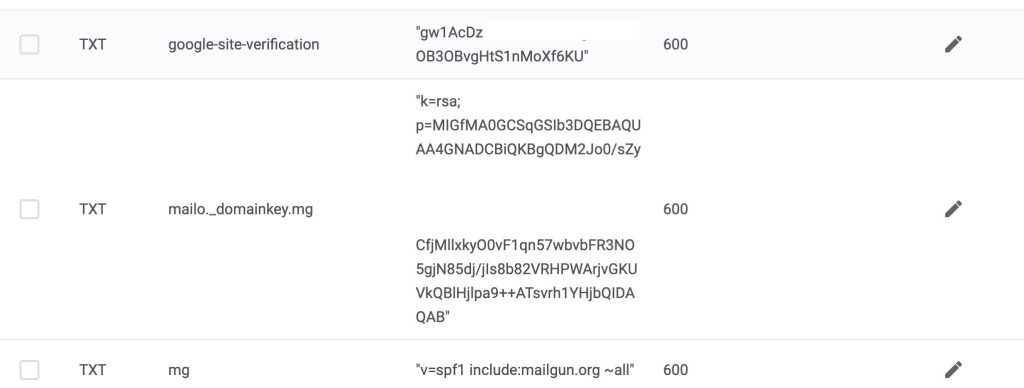
Email authentication sounds technical, but once you understand what each record does, the setup becomes much more straightforward. These three DNS records—SPF, DKIM and DMARC—work together to prove that your emails are legitimate and help them reach the inbox instead of the spam folder.
Below is a simple, step‑by‑step guide you can follow regardless of which email platform or domain registrar you use.
SPF: Tell the world who’s allowed to send email for your domain
What SPF does:
It lists the servers and services that are allowed to send email using your domain name. If an email comes from a server not on the list, it’s more likely to be flagged as suspicious.
How to set up SPF
- Log in to your domain registrar or DNS host (e.g., GoDaddy, Cloudflare, Namecheap).
- Go to your DNS settings.
- Look for an existing SPF record. It will be a TXT record starting with v=spf1
- If you already have one, update it rather than creating a second one. You should only ever have one SPF record.
- Add the sending services you use. For example:
- Google Workspace: include:_spf.google.com
- Microsoft 365: include:spf.protection.outlook.com
- Mailchimp: include:servers.mcsv.net
- ConvertKit: include:spf.convertkit.com
- End the record with ~all or -all.
Example SPF record
v=spf1 include:_spf.google.com include:spf.protection.outlook.com ~allOnce saved, DNS changes can take a few minutes to a few hours to propagate.
DKIM: Add a digital signature to your emails
What DKIM does:
It adds a cryptographic signature to your emails so receiving servers can verify that the message wasn’t altered and that it genuinely came from your domain.
How to set up DKIM
DKIM is generated by your email service, not by you manually.
- Go to your email provider’s settings (Google Workspace, Microsoft 365, Mailchimp, etc.).
- Look for DKIM or Email Authentication settings.
- Your provider will give you one or two TXT records to add to your DNS.
- They usually look like:
- Hostname: google._domainkey
- Value: a long string of characters
- They usually look like:
- Add these TXT records to your DNS exactly as provided.
- Go back to your email provider and click Activate or Verify.
Once verified, your emails will be signed automatically.
DMARC: Tell inbox providers how to handle suspicious emails
What DMARC does:
It builds on SPF and DKIM by telling receiving servers what to do if an email fails authentication. It also sends you reports so you can see who’s sending email on your behalf.
How to set up DMARC
- Go to your DNS settings.
- Create a new TXT record.
Use this as the host/name field:
_dmarc
- Start with a relaxed policy so you can monitor without blocking anything.
Example starter DMARC record
v=DMARC1; p=none; rua=mailto:postmaster@yourdomain.com;
This tells inbox providers:
- “Don’t block anything yet” (p=none)
- “Send reports to this email address” (rua=…)
After monitoring for a few weeks
Once you’re confident everything is authenticating correctly, you can tighten your policy:
Quarantine suspicious emails:
v=DMARC1; p=quarantine; rua=mailto:postmaster@yourdomain.com;Reject suspicious emails entirely:
v=DMARC1; p=reject; rua=mailto:postmaster@yourdomain.com;This is the strongest protection and stops spoofed emails from being delivered.
Putting it all together
- SPF lists who can send email for your domain.
- DKIM signs your emails so they can’t be tampered with.
- DMARC tells inbox providers what to do when something doesn’t look right.
Once these three records are set up correctly, your deliverability improves, your domain reputation strengthens and your emails have a much better chance of landing in the inbox.
Write subject lines that earn attention
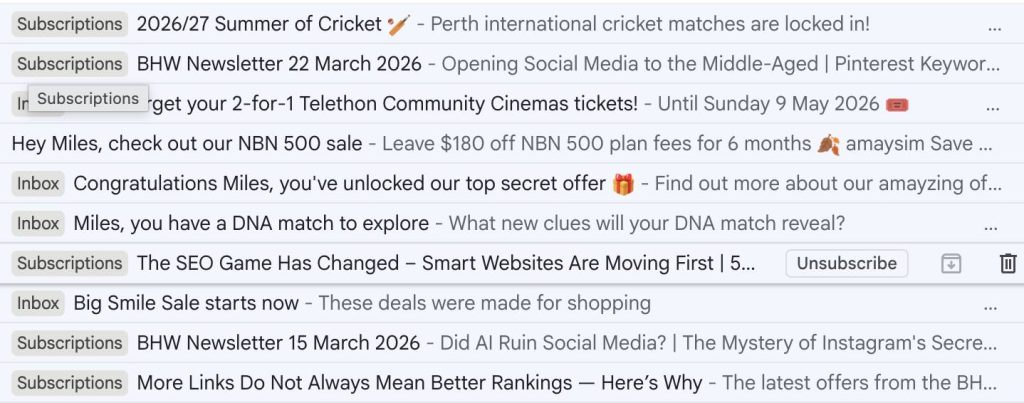
A strong subject line is still one of the biggest levers you can pull. The goal is to spark curiosity or offer a clear benefit without resorting to tricks.
Proven approaches
- Curiosity: hint at something interesting without giving everything away.
- Benefit‑driven: focus on the value the reader will get.
- FOMO: limited‑time offers or early access.
- Question‑based: ask something that relates to the reader’s needs.
- Personalised: reference behaviour or interests when appropriate.
Subject line templates you can adapt
- A simple way to improve your [goal]
- You might find this useful
- A quick update for you
- Something new we’ve been working on
- Your [topic] guide is ready
Use preheaders properly
The preheader is the short line of text that appears next to your subject line in most inboxes.
Many businesses leave it blank or let the email’s first sentence appear by default. A good preheader supports the subject line and gives readers another reason to open.
Examples include:
- Here’s what you’ll learn inside
- A quick tip that can save you time
- Don’t miss this update
- Your next step is inside
^ Back to top
Segment your audience
Sending the same email to everyone rarely works. Segmentation helps you send more relevant messages, which naturally leads to higher open rates.
Behaviour‑based segments
- People who viewed a product but didn’t buy
- Subscribers who downloaded a resource but didn’t take the next step
Lifecycle segments
- New subscribers
- Repeat customers
- Lapsed customers
Engagement‑based segments
- Highly engaged readers
- Low‑engagement subscribers
- Apple MPP users
Personalisation beyond first names
Most people have seen enough “Hi [First Name]” emails to tune them out. It’s become the default, and anything that becomes the default quickly loses its impact. Real personalisation isn’t about sprinkling someone’s name into a sentence—it’s about making the email feel like it was written for them, not for a list.
The easiest way to do that is by tailoring the content itself. Location is a simple starting point: a café promoting a winter menu shouldn’t send the same message to subscribers in Darwin as it does to those in Hobart.
Interests are another powerful signal. If someone consistently clicks on articles about small business marketing but never touches your links to blogging content, show them more of what they’ve already demonstrated they care about.
Behaviour is where personalisation becomes genuinely effective. Referencing what someone last interacted with; say an article they read, a product they viewed, a resource they downloaded, creates a sense of continuity.
It shows you’re paying attention and not just blasting out generic updates. Even subtle touches, like acknowledging how long someone has been on your list or recognising a milestone (“You joined us six months ago—here’s what you might have missed”), can lift engagement.
The goal isn’t to make the email feel hyper‑targeted or creepy. It’s simply to make it feel relevant. When readers sense that the message aligns with their needs, habits or stage in the journey, they’re far more likely to open it.
Personalisation done well feels natural, not forced—and that’s what keeps people coming back.
Send at the right time
There’s no universal “best time” to send emails, no matter how many blog posts claim otherwise. Your audience’s habits will always matter more than generic advice pulled from industry averages.
A local café’s subscribers behave very differently from a B2B SaaS product audience, and even within a single list, people open emails at wildly different times depending on their routines, timezone and work patterns.
The most reliable way to find your ideal send window is to look at your own data. Check when people tend to open and click, not just on one campaign but across several months.
Patterns usually emerge: maybe your readers are most active mid‑morning, or perhaps they prefer evenings when they’re not rushing between tasks. These insights are far more valuable than any “Tuesdays at 10am” rule of thumb.
Most modern email platforms now offer send‑time optimisation, which quietly handles this for you. Instead of blasting your entire list at once, the platform delivers each email at the moment that subscriber is historically most likely to engage.
It’s a small shift, but it often leads to a noticeable lift in open rates because you’re meeting people when they’re actually paying attention.
The goal isn’t to chase a magic hour—it’s to respect your audience’s rhythms. When your emails arrive at a time that fits naturally into their day, they’re far more likely to be opened rather than buried.
Keep your emails light to avoid Gmail clipping
Gmail clips emails that exceed 102 KB, which hides part of your content behind a “View entire message” link. This can hurt engagement and make your email look broken.
To avoid clipping:
- Compress images
- Remove unnecessary code
- Keep your design simple
- Test your email size before sending
Use AI to improve open rates
AI tools can help you work faster and test more ideas, but they’re not a replacement for judgement or understanding your ideal customer. Think of them as an extra set of hands—useful for generating options, spotting patterns and speeding up repetitive tasks, while you stay in control of the strategy.
One of the simplest ways to use AI is for subject line ideation. Instead of staring at a blank screen, you can generate a handful of variations, refine the ones that feel right and discard the rest. It’s a quick way to explore different angles—curiosity‑driven, benefit‑focused, question‑based—without spending half an hour brainstorming.
AI can also help with timing. Some platforms analyse past engagement and suggest windows when your audience is most active. It’s not perfect, but it gives you a data‑informed starting point, especially if your list spans multiple time zones or industries.
Segmentation is another area where AI shines. By analysing behaviour—what people click, how often they engage, what they ignore—AI can surface patterns you might miss. That might mean identifying a cluster of subscribers who only open educational content, or a group that consistently engages with product updates. These insights make it easier to send emails that feel relevant rather than generic.
And then there’s testing. AI‑powered A/B tools can automatically rotate subject lines, preheaders or send times, learn from the results and adjust future sends to optimise for better conversion. It removes the manual work while still giving you the benefit of ongoing optimisation.
The key is to treat AI as a helper, not a shortcut. It can speed up the process and uncover opportunities, but the final decisions—what to send, how to say it and who it’s for—still rely on your understanding of your audience.
When you combine your judgement with AI’s ability to process patterns quickly, you get the best of both worlds: faster workflows and more effective emails.
Measure engagement beyond open rates
Because open rates are less reliable than they used to be, it’s important to look at other metrics:
- Click‑through rate
- Click‑to‑open rate
- Conversions
- Replies (especially for B2B emails)
These numbers give you a clearer picture of whether your content is resonating.
Troubleshooting: why your open rates might be dropping
If your open rates start slipping, it’s rarely random. There’s usually a clear cause hiding underneath, and the sooner you identify it, the easier it is to fix. Most declines come back to a handful of common issues.
Deliverability problems are the biggest culprit. If your domain reputation takes a hit—maybe from a spike in bounces, spam complaints or inconsistent sending—your emails may quietly start landing in the promotions tab or, worse, the spam folder. When that happens, even your most loyal subscribers won’t see your messages.
A tired or unengaged list can also drag your numbers down. Over time, people change jobs, switch email addresses or simply lose interest. If you keep emailing everyone indefinitely, the disengaged portion of your list grows, and your open rates fall with it. Regular list cleaning and re‑engagement campaigns help keep this under control.
Sometimes the issue is simply irrelevant content. If your emails drift away from what people originally signed up for, or if every message feels like a sales pitch, subscribers stop opening. Relevance is the quiet engine behind strong open rates, and once it slips, engagement follows.
Poor segmentation can make the problem worse. Sending the same message to everyone—regardless of their interests, behaviour or stage in the customer journey—leads to fatigue. People tune out when they feel like they’re receiving generic updates rather than something meant for them.
And then there’s Apple Mail Privacy Protection, which complicates things by inflating open rates. If a large portion of your audience uses Apple Mail, your numbers may look healthier than they really are. When the inflated openings mask a real decline in engagement, it’s easy to miss the warning signs.
The important thing is to catch these issues early. A slow, steady drop in open rates is often a sign that your sender reputation is weakening, and once that happens, recovery takes time. By monitoring your metrics, keeping your list healthy and staying close to what your audience actually wants, you can prevent small problems from turning into long‑term deliverability damage.
Checklist: 20 ways to improve email open rates
- Authenticate your domain
- Monitor your sending reputation
- Clean your list regularly
- Remove unengaged subscribers
- Write clear, honest subject lines
- Use strong preheaders
- Segment your audience
- Personalise based on behaviour
- Test send times
- Keep emails lightweight
- Avoid spam‑triggering language
- Use AI for ideas and testing
- Review engagement metrics
- Refresh stale content
- Re‑engage inactive subscribers
- Offer something genuinely useful
- Keep your tone consistent
- Test different formats
- Optimise for mobile
- Send fewer, better emails
In Conclusion
Improving your email open rates isn’t about chasing hacks or relying on some clever wording.
It comes from doing the fundamentals well: keeping your list healthy, sending messages people actually want, and making sure your emails reach the inbox in the first place.
When you combine solid deliverability, thoughtful segmentation and clear, honest communication, your open rates naturally rise. The tools and tactics will continue to evolve, but the core idea stays the same.
Respect your readers’ time, send something worth opening and keep refining your approach as you learn what resonates. Over time, those small improvements add up to a stronger, more engaged audience.